Headings for Product Names and Product Tags in a Catalog: Does It Help SEO and What Really Works?
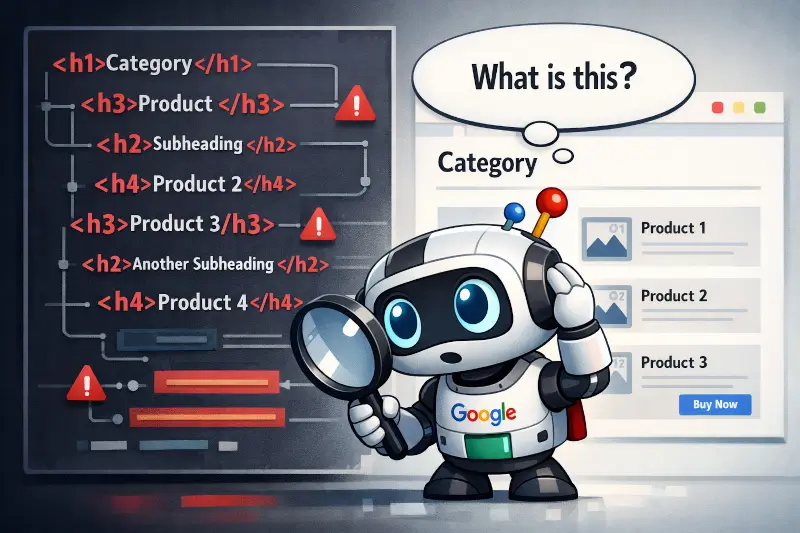
We break down one of the most common questions when building online stores: should you force heading tags onto product cards to boost SEO — and what do search engines actually think about the <h1>–<h6> hierarchy on catalog pages?
Context: why this question comes up at all
Picture a typical e-commerce catalog page. It has dozens of product cards: a name, a price, a few labels ("sale", "new arrival", "bestseller", characteristics, specifications, etc), and a "Buy" button. The question arises: should the product name and labels be wrapped in heading tags?
The logic is intuitive: headings are relevance signals for search engines. If <h1> is the section name ("Laptops") and <h2> is a subcategory or filter ("Gaming Laptops"), then the specific product name seems to "belong" in an <h3>. Many people think this way. But is it correct?
What Google says about headings
First, the primary source. Google publicly explains its stance on headings in the Search Central documentation:
«Use heading elements to create a structure that reflects the hierarchy of the page content. Don't use headings for things that are not headings (for example, don't use headings to style text).» — Google Search Central: Title links in search results
The key phrase: "don't use headings for things that are not headings." This isn't just stylistic advice — it's a signal about how Googlebot interprets markup.
John Mueller, Google's Search lead analytic, has touched on this topic repeatedly.
«Doing things properly (right order headings) is a good practice, it helps search engines lightly to better understand your content, and it's good for accessibility.» — John Mueller, Search Engine Journal
It's also worth consulting the web.dev Learn HTML documentation, maintained by Google:
«It is recommended to use heading levels similarly to heading levels in a text editor: starting with a<h1>as the main heading, with<h2>as headings for sub-sections, and<h3>if those sub-sections have sections; avoid skipping heading levels.» — web.dev — Headings and sections
Google's bottom line: headings are a tool for structuring content — not a lever for pumping keywords into relevance signals.
H3 for product names: arguments for and against
Arguments for
If the page hierarchy looks like this:
Then <h3> for the product name is logically sound from a semantic standpoint. Google can use this structure to build breadcrumb-style fragments in search results and to understand which element is the primary focus of the card. Schema.org/Product recommends marking up a product name in a semantically prominent way — and a heading tag is one valid option.
There's also an accessibility argument: screen readers use headings to navigate a page. If the product name is in an <h3>, users with visual impairments can quickly jump between product cards. This indirectly correlates with quality signals that Google factors in.
Arguments against
<h3>, the page ends up with 48 third-level headings. That's not a hierarchy — that's noise.
Google doesn't "split" a heading's SEO weight evenly across all <h3> tags — but the more headings there are, the less informative each one becomes. The algorithm expects <h3> to mark an important subsection, not one of 48 identical-looking elements.
There's also a keyword stuffing risk. Product names almost always contain keywords, so turning all of them into <h3> tags can read as over-optimisation. Independent analysis by Moz On-Page SEO Factors confirms: what matters isn't the tag itself, but the relevance and uniqueness of the content inside it.
Verdict on H3
<h3> tags end up identical. Use <p>, <span>, or <a> with appropriate aria attributes instead.
H4 for product tags: does it make sense?
Product tags are labels like "Bestseller", "Silver color", "RTX 4070", "240 Hz". The question: should they get an <h4>? The answer is almost always no, and here's why:
- Labels are not section headings. According to the HTML5 spec (and the WHATWG HTML Living Standard),
<h4>marks a subsection subheading. The label "Sale" is not a subsection of a product description. - Signal dilution. If
<h4>contains the word "sale" or "bestseller" for every single product, that's syntactic noise, not structural information. - Rich snippets are more effective. For product tags and specifications, Google expects structured data (Schema.org) — not HTML heading tags.
The correct markup for product tags looks like this:
<!-- Instead of h4 for a tag -->
<ul class="product-tags" aria-label="Product labels">
  <li><span class="tag tag--sale">-30%</span></li>
  <li><span class="tag tag--new">New Arrival</span></li>
</ul>

<!-- And separately, Schema.org for specs -->
<div itemscope itemtype="https://schema.org/Product">
  <span itemprop="name">ASUS ROG Strix G15</span>
  <span itemprop="offers" itemscope itemtype="https://schema.org/Offer">
    <span itemprop="price">1299</span>
  </span>
</div><dl> / <dt> / <dd> — the semantically correct definition list markup that Google also understands.
| Criterion | H4 for tags | span / ul / dl / dt / dd |
|---|---|---|
| Hierarchy logic | ❌ Tags are attributes, not subheadings | ✅ An attribute is an attribute |
| SEO significance | ⚠️ Minimal: "5G" or "New" aren't meaningful keywords | ✅ Neutral, causes no harm |
| Accessibility (a11y) | ❌ Confuses screen readers: "heading" ≠ "label" | ✅ Use role="tag" or aria-label |
| Practical effect | ❌ Zero to negative | ✅ Clean HTML, better for crawling |
The correct heading hierarchy on a catalog page
Here is the recommended structure for a typical catalog page that balances SEO logic with HTML semantics:
| Page element | Recommended tag | SEO weight | Note |
|---|---|---|---|
| Section name ("Laptops") | <h1> |
High | One per page |
| Subcategory or filter heading | <h2> |
Medium | When there's a logical subsection |
| Product name (few cards) | <h3> |
Moderate | Up to 10–15 cards per page |
| Product name (large catalog) | <p> or <a> |
Indirect | Semantics via Schema.org |
| Product tags ("sale", "new") | <span> or <li> |
Low (h4) | Do not use h4 |
| Specifications (RAM, screen size) | <dl> + Schema.org |
High | Eligible for rich snippets |
| Price | <span itemprop="price"> |
High | Must be paired with Schema.org |
Real A/B Test: OrangeValley × Semrush
Theory is one thing — real tests are another.
Netherlands-based agency OrangeValley, in collaboration with Semrush SplitSignal, ran a controlled SEO experiment: does adding H3 tags to product names on category pages affect organic traffic?
OrangeValley × Semrush SplitSignal (2022)
One of the largest Dutch e-commerce platforms. The test: adding <h3> tags to product names on category pages vs. leaving them as plain text.
on test pages
from OrangeValley
Source: Semrush Blog — SEO Split Test Result: Adding H3 Tags to Product Names on Ecommerce Category Pages
An important caveat came from SEO specialist Jimmy Jensen, commenting on the test:
"Why not use H2? WooCommerce categories use this by default. H3 would be a downgrade." — Jimmy Jensen, LynxSEO Marketing (Semrush Blog)
This underlines the core principle: H2 vs. H3 depends on the rest of the page structure, not a universal rule.
The final overall
🎯 Key takeaways
- ✔Use
<h3>for a product name only if it genuinely represents a content hierarchy level (few cards, clear h1→h2→h3 structure) - ✘Don't use
<h3>on a large catalog — more than 30 third-level headings cancel each other out - ✘Don't use
<h4>for product tags — tags are not section subheadings - ✔For tags, use
<span>or<li>with semantic class/aria attributes - ✔For specs and prices, use Schema.org (Product, Offer, AggregateRating)
- ✔Never skip heading levels (h1 → h3 without h2 is bad practice)
- ✔Think about accessibility: screen readers are the first "search engine" that reads your markup
<h3>–<h4> tags on catalog pages are neither evil nor a silver bullet. They make sense when they reflect the actual structure of your content. When placed "for SEO" without structural logic, Google sees through it — and the outcome is either zero effect or a negative one.
Markup should describe structure, not try to manipulate it. The most powerful SEO signals on a catalog page are a clear h1, unique content, Schema.org structured data, and fast load times. Everything else is a detail.